
Use case · Seasonal lighting
Schedule seasonal Art-Net shows and recover after power returns.
Record the programmed lighting sequence, leave a Raspberry Pi on site and run daily playback from a schedule, GPIO input or autoplay — without keeping the lighting console connected.
A smaller playback system for a repeatable seasonal show
Holiday façades, light trails, winter displays and temporary public installations often repeat the same programmed sequence for a defined season. CUE/IO records the console's Art-Net output — DMX lighting values carried over Ethernet — and replays the captured show from Raspberry Pi.
The programming console can be removed after commissioning. The deployed system remains accessible through a local browser, while automated start methods handle the daily routine.
Prepare the show before opening day
- Complete programming on the real installation.Confirm fixture addressing, Art-Net universes and the intended show timing.
- Record and review the complete sequence.Capture Art-Net and optional synchronized audio, then replay it to verify the beginning, loop point and ending.
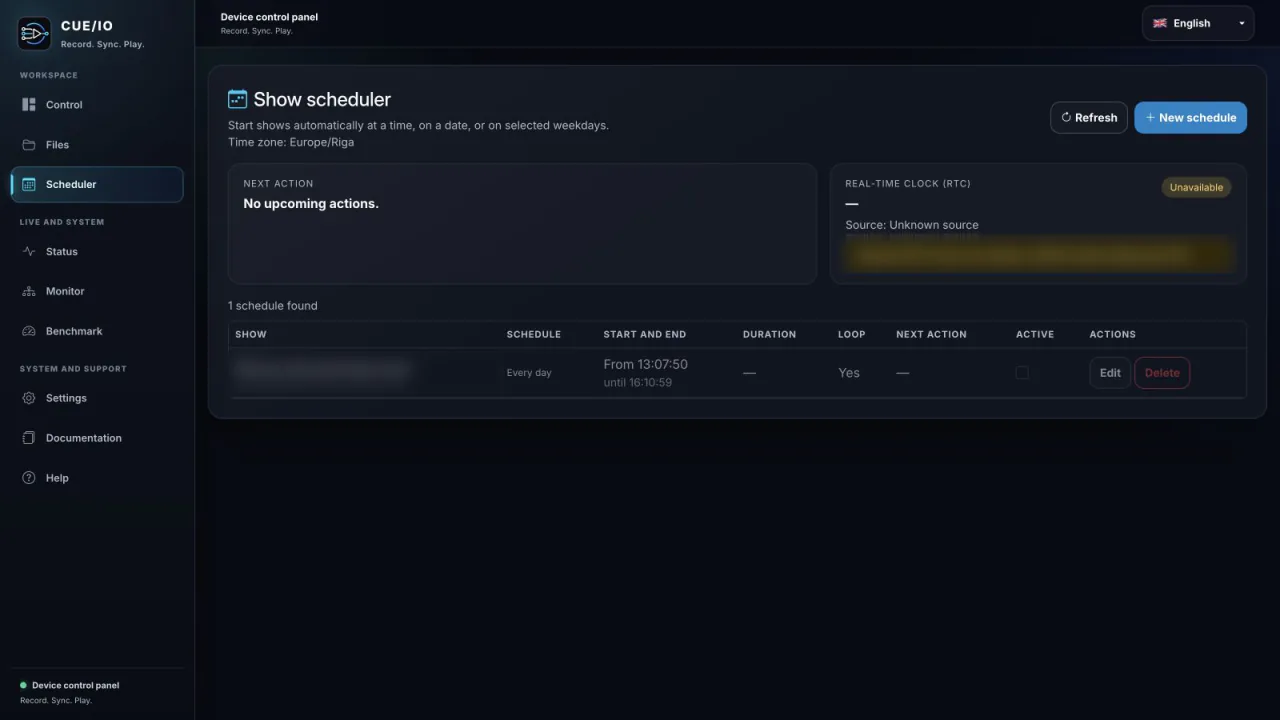
- Configure the operating calendar.Set dates, weekdays and start times that match the public schedule.
- Test power recovery.Restart the deployed Raspberry Pi and confirm whether autoplay, scheduling and the watchdog restore the behaviour you expect.
- Export a backup.Keep the final show files and operating notes away from the device.
Treat restart behaviour as part of the show design
A seasonal installation may lose power or be deliberately switched off outside operating hours. Decide in advance whether playback should resume automatically, wait for the next scheduled event or require a local check.
- Autoplay can start a prepared sequence after the Raspberry Pi boots.
- The scheduler can wait for the next valid event.
- The watchdog can restart the application if it stops responding.
- A local browser can show status before staff open the display.
Universe capacity and operating headroom depend on the Raspberry Pi model, storage, network, audio use and show. Use the built-in benchmark instead of assuming a generic universe count.
Seasonal deployment checklist
- Quality Raspberry Pi power supply and protected installation enclosure.
- Wired Ethernet connection to the Art-Net network.
- Clear shutdown procedure when staff remove power.
- Optional Linux-compatible USB audio input where the show includes sound.
- Optional DS3231 RTC for offline calendar accuracy.
- Named, exported show files and a short recovery guide for local staff.